
A smarter approach to advice generation
By Brooke Kelly | 5 minute read
The new Plutosoft default Statement of Advice (SOA) template is now live, and it’s designed to make advice generation more efficient, and easier to tailor to each client.
In our recent webinar, Plutosoft Co‑Founder Vincent Holland walked advisers through what’s changed, why those changes matter, and how to start using the new template right away. Here’s a snapshot of what you need to know.
Why we released a new SOA template
With regulatory reform still in limbo and no clear timeline for changes to advice documentation, we decided: don’t wait. Instead, we focused on improving the SOA advisers are using today, refining structure, adding smarter automation, and reducing manual effort where it matters most.
What’s new
The updated template introduces several meaningful enhancements designed to improve clarity for clients and efficiency for advisers.
Clearer scoping, upfront
A new Reasons for Seeking Advice section allows advisers to explain why a client came in, not just what’s technically in scope. It helps frame the advice in a way that’s more meaningful and client‑friendly from the outset.
Smarter automation through substitution strings
Legislative parameters are now handled using dynamic substitution strings. When contribution caps or thresholds change, your template updates automatically – no manual edits required across strategy text.
A significantly enhanced insurance section
Insurance advice has been streamlined into a single chapter, with expanded automation to handle different policy types, funding methods, and premium structures. Whether insurance is funded personally or through super, the relevant explanations are generated automatically saving time while maintaining compliance clarity.
New appendix for supporting detail
More technical or educational content has been moved into a new appendix section. This keeps the core advice concise, while still giving clients access to deeper explanations when needed.
More powerful data sources
The new template also incorporates enhanced and newly positioned data sources, including:
- Salary sacrifice and tax savings comparisons
- Account‑based pension details and payment summaries
- Life insurance projections showing long‑term impact on super balances
- Cash flow summaries pulled directly from the fact find
- Insurance commission disclosures aligned with consent requirements
All tables and charts are populated automatically from your data, no manual maintenance required.
Getting started is simple
The template is already available in your template library (with the exception of dealer‑group‑managed environments). To start using it:
- Link your existing style sheet
- Remove the tax/non‑tax adviser section that doesn’t apply
- Review and tailor disclosure wording to your practice structure
From there, you can customise chapters, build your own scoping text library, and add client‑specific commentary where needed.
Designed for flexibility
If you already use a custom SOA template, you don’t need to start from scratch. Sections can be copied across, allowing you to adopt improvements selectively.
And with greater support for custom commentary, advisers can strike the right balance between automation and personalised advice.
Webinar Q&A: Your Questions Answered
Q. I have an SOA template set up for my business; do I need to update all the data sources?
A. If you are adopting our new SoA template, all the data sources discussed in the webinar are already in place and do not need to be added. You can review, change or exclude as you see fit.
Q. Will the recommendations sections in the new template work if we copy over to an existing template?
A. Yes, you can copy sections of the new template to an existing template and they will work.
Q. We have a number of significant modifications & customisation in our current Plutosoft SOA template. Does this mean we have to comb through each section of the new SOA template to apply our modifications?
A. There may be sections of the new template you would like to incorporate, we would suggest that you review the new sample SoA. Please note, many of the changes are in the insurance section, so you may wish to copy this whole chapter.
Q. We have a tailored SOA already. Would you suggest we copy sections from the new default template into our customised version or are we better off copying from our version and inserting into the Pluto template and customise it that way?
A. Assuming your existing template is highly customised, we would suggest copying the relevant sections from the new template and inserting into your existing template.
Q. Is there a TTR salary sacrifice table comparison?
A. The new salary sacrifice data source shows tax savings of salary sacrifice, it doesn’t include pension income, the full cashflow is presented in the usual projections section. There is also a new Account Based Pension data source which will also cover a TTR recommendation.
Q. Will commission consent form part of ATP?
A. It sits as its own chapter under the Authority to Proceed.
Q. Where do we maintain the library of custom commentary?
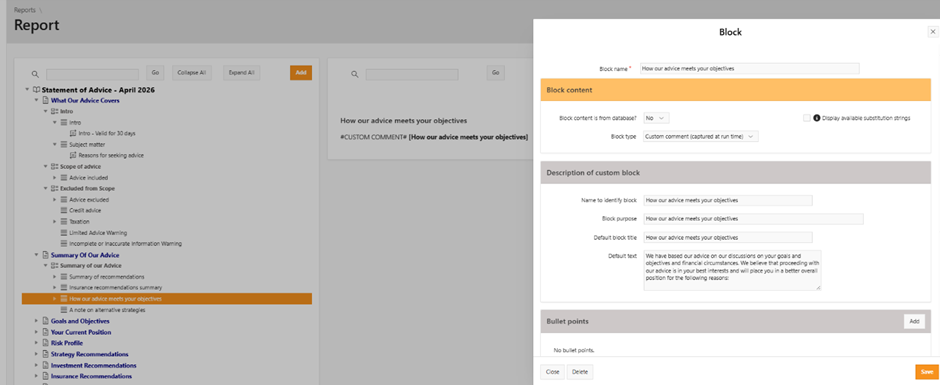
A. You can customise any custom commentary pro forma text by clicking the pencil icon. If you want to add your own custom commentary block, set the box type to “Custom Comment” when creating the block.
Q. Can you create a template for each adviser?
A. Yes, you can copy report templates in your library.
Q. How editable is the insurance expense (over 10 years)? Many insurance companies offer a first-year discount but are more expensive over the long term.
A. In your life insurance expenses you can insert whichever premium you wish to apply. You can index the first-year premium, or custom enter the premium for each year over the decade or longer.